Follow the steps below to learn how to set the Eloqua integration to sync with attendee activities.
| NOTE: This is an add-on to the Eloqua integration. Contact your account manager for access. |
1 Create a custom object. Log in to the Eloqua account you linked with Cvent and create a custom object called Cvent Attendee Journey. Configure the following settings:
- Display Name Field - Activity
- Group by Field - Cvent Event Name
- Entity Type - Contacts
- Entity Field - Email Address
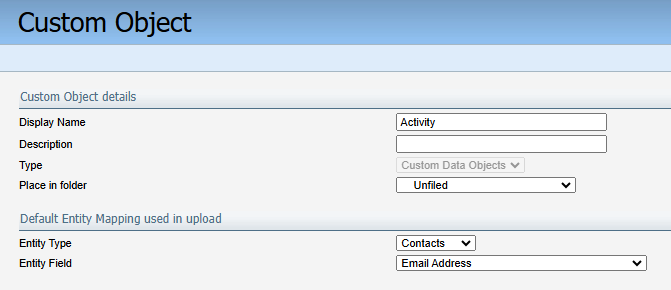
Now, configure the following fields:
- Cvent ID - Set the data type to string. This will store the unique ID for this record. Data is stored in this format: AttendeeID:ActivityID
- Details - Set the data type to string. Contains the Activity related info, names & ID.
- Activity - Set the data type to string. Contains the activity name.
- Cvent Event - Set the data type to a string. This will store the event where the attendee is found.
- Cvent Event Code - Set the data type to string. This will store the event's unique ID.
2 Configure in Cvent. Reach out to your Cvent account team to have the integration turned on in your account. Once its on, you will see the Enable Attendee Activities sync to Eloqua custom field to manage the integration in your event. This field will regulate whether the data will sync from the specific Cvent Event to Eloqua. When set to Yes, the data will sync from the event to the Eloqua custom object once an hour.